What's the Difference Between a Google Account and a Gmail Account? Are They the Same Thing?
What is the difference between a Google Account and a Gmail account? Learn how they are connected, what each is used for, and whether you need Gmail to access YouTube, Google Drive, Google Photos, and other Google services.
When people first start using Google services, many assume that a Google Account and a Gmail account are two separate things. After all, you sign into Gmail with something like xxx@gmail.com, and when you sign into YouTube, Google Drive, or Google Photos, you use that same email and password—so it looks like there's no difference. But strictly speaking, a Google Account and a Gmail account are not exactly the same concept.
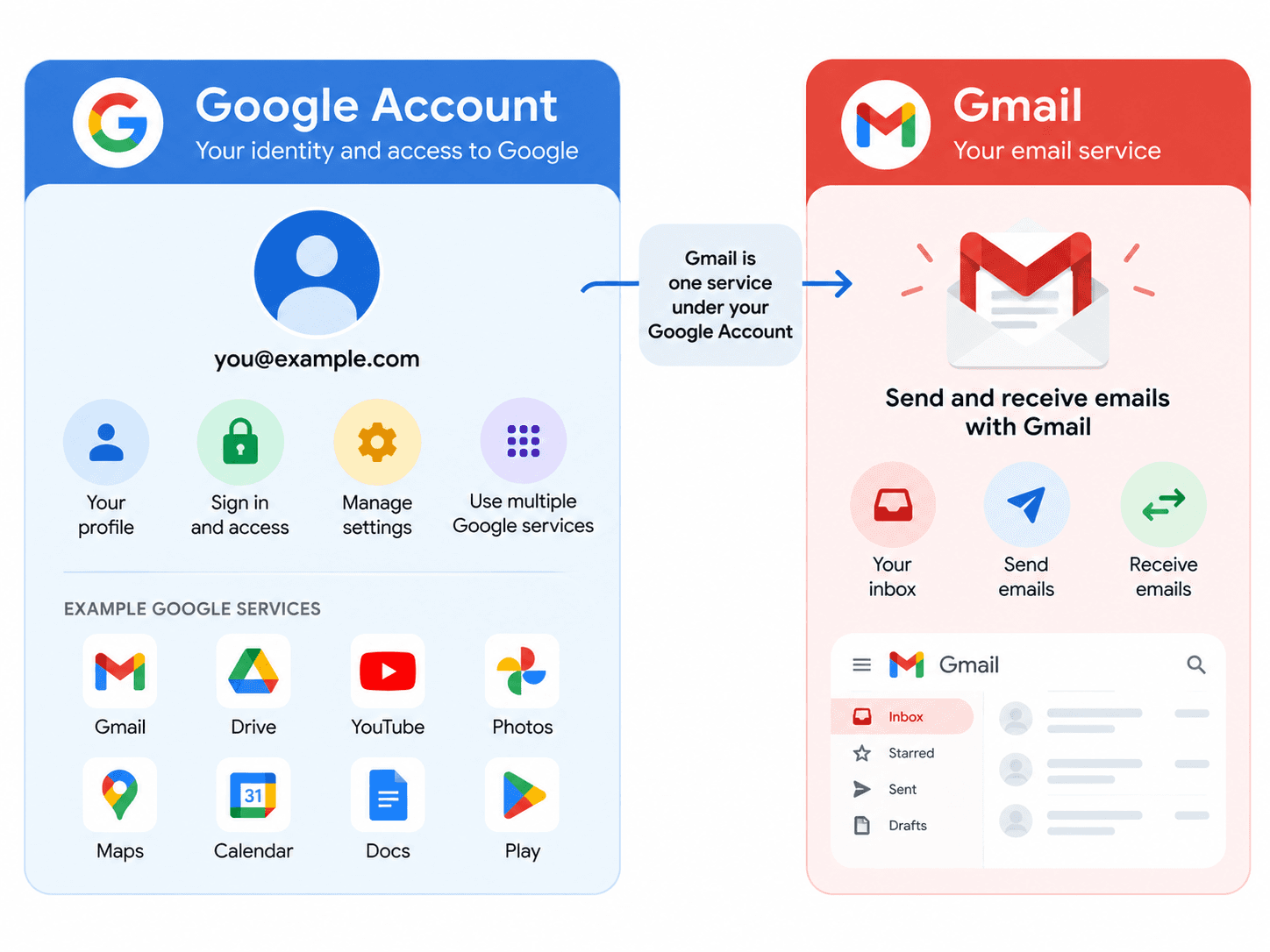
Simply put, a Google Account is the identity you use to access Google's entire ecosystem, while Gmail is just one email service that Google offers. You can sign into your Google Account using a Gmail address, but a Google Account doesn't necessarily have to be tied to an @gmail.com email.
For everyday use, this distinction may not matter much. But when it comes to account registration, email binding, business use, account recovery, or deleting Gmail, the difference becomes important.
1. What Is a Google Account?
A Google Account is essentially your unified identity across Google's entire product lineup. Once you sign in, you can use YouTube, Google Drive, Google Photos, Google Calendar, Google Play, Google Docs, and many other services without having to register separately for each one.
Google's official description of a Google Account is fairly clear: it lets users access most Google products using an email address and password or a passkey, while centrally managing their profile, privacy, security settings, and data across devices. So from an account system perspective, it's more like a "Google passport."
For example, when you sign in with example@gmail.com, what you're really signing into is the Google Account associated with that email. After that, when you open YouTube, Google Drive, or Google Calendar, as long as you're still signed in through your browser, you typically don't need to create a new account.
This is why so many people just call a Google Account a "Gmail account."
2. What Is a Gmail Account?
Gmail itself is first and foremost an email service. When you sign up for Gmail, you get an email address like this: example@gmail.com
You can use it to send and receive emails, register on websites, receive verification codes, or serve as a contact email for other internet services.
However, one thing that sets Gmail apart from many regular email services is this: when you have Gmail, you also automatically have a Google Account.
Google's official Help Center states directly that if you're using Gmail, you already have a Google Account, and you can use it to access Drive, Docs, Calendar, and other Google products.
So in practice, this is what it often looks like:
example@gmail.com
        ↓
   Google Account
        ↓
 ┌────────────────┐
 Gmail
 YouTube
 Google Drive
 Google Photos
 Google Calendar
 Google Play
 └────────────────┘
This is exactly where the two get most easily confused.
3. What Exactly Is the Difference Between a Google Account and a Gmail Account?
When you put them side by side, the difference becomes much easier to see.
| Comparison | Google Account | Gmail Account |
|---|---|---|
| Nature | Google's unified identity account | An email service provided by Google |
| Primary purpose | Sign in to and manage Google services | Send and receive emails |
| Always ends in @gmail.com? | Not necessarily | Yes |
| Can use YouTube? | Yes | Yes, through the associated Google Account |
| Can use Google Drive? | Yes | Yes, through the associated Google Account |
| Can use other email addresses? | Yes | The Gmail address itself cannot |
| Password | Google Account password | Actually uses the associated Google Account password |
The simplest way to remember it is: a Google Account is the account system, and Gmail is one service within that system. Google officially distinguishes between these two concepts and points out that Gmail is just one of many Google services accessible through a Google Account. So "Google Account" and "Gmail email" are not simply interchangeable.
4. If You Have a Gmail Account, Do You Definitely Have a Google Account?
If you already have: yourname@gmail.com, then there's usually a corresponding Google Account behind that Gmail address.
You can use it to sign into Gmail directly, and you can also use it to sign into YouTube, Google Drive, Google Photos, Google Calendar, and other Google products. For most regular users, "my Gmail account" and "my Google account" often refer to the same sign-in identity—just different ways of saying it.
The real thing to watch out for is the reverse situation.

5. If You Have a Google Account, Do You Definitely Have a Gmail Email?
Having a Google Account doesn't necessarily mean you have a Gmail email. Google currently allows users to create a Google Account using an existing third-party email address, rather than requiring them to create a new @gmail.com email. Google's official account creation instructions still offer the option to "use your existing email."
For example, if you already have: name@outlook.com
Then, as long as it fits Google's current registration process, you can use that email to create a Google Account.
The resulting structure might look like this:
name@outlook.com
       ↓
Google Account
       ↓
YouTube
Google Drive
Google Calendar
Google Photos
But in this case, you don't have: name@gmail.com
So, having Gmail basically means you have a Google Account, but having a Google Account doesn't necessarily mean you have a Gmail email.
If you just want to understand these two concepts, remembering this one point is basically enough.
6. Why Do You Rarely Notice the Difference in Everyday Use?
Mainly because for the vast majority of regular users, the entry point to Google services is Gmail.
Many people create an @gmail.com email when they sign up. Once registration is complete, that email address also becomes the primary sign-in identity for their Google Account.
After that, whether they open Gmail, YouTube, Google Drive, or Google Photos, the page usually still shows:
example@gmail.comAnd they're using the same set of login credentials.
After using it this way for a long time, it's only natural to think:
Gmail account = Google AccountFrom a daily-use perspective, calling it that usually doesn't cause any major problems.
But when it comes to changing email addresses, business accounts, registering with third-party emails, or deleting Gmail, you need to look at the two concepts separately.
7. Should You Register a Google Account or a Gmail Account?
This really depends on what you plan to do with the account. If you just want to use Google services like YouTube, Google Drive, and Google Photos, and you already have a long-term email address you use, you can create a Google Account using whatever registration method Google currently offers—you don't necessarily need to apply for a Gmail address separately.
But if you need to use email for receiving messages anyway—for example, signing up for overseas websites, receiving work emails, linking internet services, or getting verification codes—then creating a Gmail account directly is often more convenient.
Because with one registration, you actually solve two things at once: a Gmail email + a Google Account.
After that, you can both send and receive emails and continue using other Google products.
Some users have more specific needs, such as overseas business testing, cross-border projects, app testing, or needing to prepare different types of digital accounts. In these cases, many people don't want to handle all the upfront account preparation themselves and may consider professional digital account service platforms.
For example, Haoxiaoer is a one-stop platform for purchasing global digital accounts. In addition to Gmail and Google-related accounts, Haoxiaoer also covers a variety of commonly used overseas digital accounts. For users who already have clear account needs and want to reduce upfront preparation time, it can serve as a supplementary channel to look into.
However, whether you register an account yourself or obtain one through another channel, if you plan to use it long-term, it's advisable to check the password, recovery email, recovery methods, two-step verification, and currently signed-in devices as soon as you get the account. Also confirm the relevant platform's usage rules based on your actual purpose. Getting the account is only the first step—securely taking it over is often more important.
8. Is the Gmail Password the Same as the Google Account Password?
For regular Gmail users, you can think of it as the same password.
Because you don't have: one Gmail login password + one Google Account login password.
Gmail itself authenticates through your Google Account.
For example, when you sign into Gmail with: example@gmail.com, you need to enter the password for the corresponding Google Account.
Then when you sign into YouTube, Google Drive, or Google Photos, you're using the same Google Account.
This is also why, after changing your Google Account password, you need to use the new password when signing back into Gmail, YouTube, and other Google products.
If one day you find you can't sign into Gmail, don't go looking for a separate "Gmail password." Instead, check the password, recovery information, and security status of your entire Google Account first.
9. What's the Difference Between a Google Account, Gmail, and Google Workspace?
If you also deal with business email, you may have come across Google Workspace, and then these three concepts get even easier to mix up. A simple way to understand it: Google Account is the identity account across Google's entire product system; Gmail is the email service Google provides, with the common personal address being: username@gmail.com. Google Workspace is more geared toward businesses, organizations, and teams.
A company might have its own domain email, such as: name@company.com, but still use Gmail's interface for email as well as Drive, Docs, Meet, Calendar, and other Google services. So if an employee sees that their email doesn't have an @gmail.com suffix, that doesn't mean it's not a Google Account. The key isn't the email suffix—it's the account system and services behind it.

If you already have an @gmail.com email, you usually already have the corresponding Google Account. But if you only have a Google Account, you don't necessarily have a Gmail address. If you're just signing into Gmail, YouTube, or Drive day to day, the difference between the two really isn't very noticeable. But when it comes to registration methods, changing email addresses, business use, account recovery, or deleting Gmail, keeping these two concepts straight will make many account issues much easier to understand.
Related Q&A
Q1: If I delete the Gmail service from my Google Account, will my YouTube and Google Drive data still be there?
A: Yes, it will. Gmail is just one sub-service bound to your Google Account. If you only choose to "remove Gmail service" in the backend, the system will only deactivate your @gmail.com email address and ask you to bind a third-party email (such as Outlook or QQ Mail) as your primary login account. After completing the setup, your YouTube subscriptions, files stored in Google Drive, and photos in Google Photos will all remain intact.
Q2: I registered a Google Account with a Microsoft Outlook email. Can I add a Gmail email later?
A: Yes. After signing into your Google Account with the third-party email, visit the Gmail website (mail.google.com), and the system will prompt you to "add Gmail" to your current account. Once set up, the new @gmail.com address will become the primary email for that Google Account, and the original Outlook email will automatically be downgraded to a "backup login email" or "recovery email." Both use the exact same password and can be used to sign in.
Q3: How many Google Accounts and Gmail accounts can one phone number be bound to or verify?
A: Google has frequency limits on a single phone number during the "registration verification" stage (typically the same phone number can be used to register 4–5 new accounts per year). Beyond that, you'll see a message saying "This phone number can't be used for verification." However, when a phone number is used as a "security backup verification number (2FA)," the limits are relatively looser. It's best not to bind one phone number to too many long-term core accounts at the same time, to avoid triggering security risk controls that could lead to mass account bans.
Q4: If I only change the Gmail email alias, will it affect my Google Account login password or profile?
A: No. Aliases set up in Gmail (for example, adding +work after your main email or setting up a forwarding alias) only affect the routing of sent and received emails—they don't change your Google Account's underlying ID. Your login password, two-step verification settings, Google Photos albums, and purchased Google Play apps are all unaffected.
Q5: When signing into a Google Account on an Android phone, does the system sync Gmail or all Google services?
A: By default, the system syncs all service data associated with the entire Google Account. In your phone's "Settings - Accounts - Google," you can independently toggle sync for each sub-item—for example, enabling only "Calendar" and "Contacts" sync while turning off automatic sync for "Gmail" or "Drive"—giving you flexible control over data usage and privacy.